I have a HP laptop running Windows 11 with an AMD Ryzen 5 7520 U CPU. Whenever I watch YouTube or run a “light” graphics Steam game on my computer, the temperature starts slowly increasing to around 80-85 degrees and stays there, despite CPU usage only being at around 35-40%.
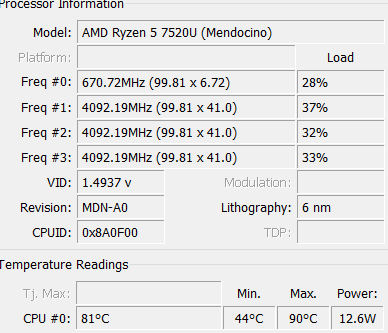
This is what CoreTemp says whenever I play a video. When I pause the video or close the tab, it only drops down to around 55 degrees, despite CPU usage going down to 10%. I can hear the fans spinning inside the laptop and feel the air being pushed out of the bottom vents (my laptop has no side vents), but they only seem to kick in at their hardest whenever I run a separate program. Whenever I watch a video the temperature still rises to the same level, but the fans barely run.
I’ve tried:
- Installing all available Windows 11 updates.
- Installing all available AMD processor/graphics drivers (I also checked Device Manager and saw no alerts, so I assume the other drivers are fine).
- Closing all other programs besides CoreTemp (this did reduce the temperature by around 3 degrees).
- Raising the bottom of the laptop up to make the air passageway wider (this did nothing).
- Checking the vents for dust.
I barely know anything about computer parts, and I have no idea where to go from here.
