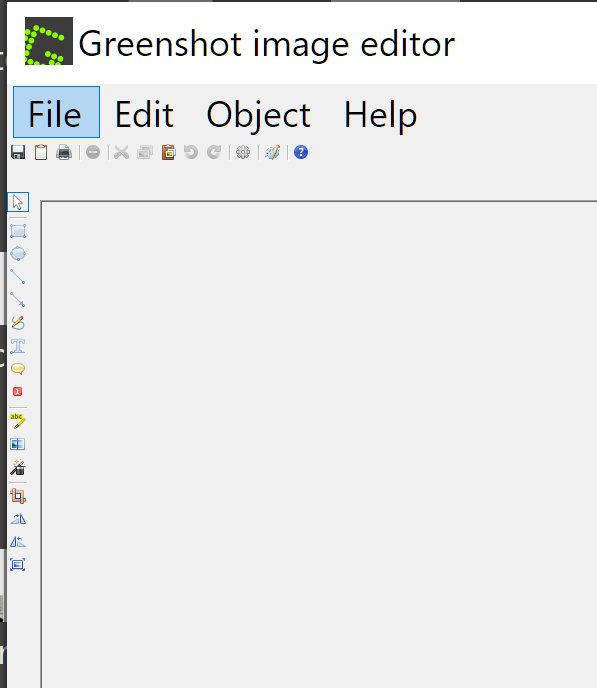
The Greenshot image editor doesn’t seem to compensate for high resolution displays. The screenshot below illustrates the problem. I tried to report this via your bug-reporting process but it insists that I log in first, but doesn’t explain how to get log-in credentials. So I’m here. Hope that’s ok.
Per your request re reporting bugs:
- Operating system and its version on which you are facing the issue.
Windows 10/64-bit 22H2 on a Lenovo Yoga, i5 16gb Ram
Display: 3840×2160 (recommended) Scaling at 300% (recommended)
With some programs that have trouble with these display settings, I can change Scaling to a lower value to solve the problem. Greenshot doesn’t seem to respond to scaling changes, either “on the fly” or when I quit and restart it under the new scaling settings.
- The version of Greenshot and where you downloaded it, espcially if it wasn’t from getgreenshot.org.
Version 1.2.10 build 6, 64bit
- A detailed description of your problem, what happened, and what did you expect to happen instead, please also include a step-by-step guide how the problem can be reproduced.
As below; I used the print key, captured a screenshot and had Greenshot open the result in the editor.