I tried to back up my profile in Visual Studio Code, but cannot.
- If I click on the dots next to my profile in the profile tab and click export, a popup in the lower right indicates it is exporting my profiles, but where it is saved, I do not know (see images). I search my entire system, and cannot find the exported profile. There is no option to chose a location or name the file.
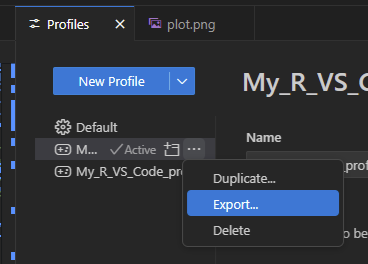

- If I open the command palette (Ctrl + Shift + P) and click Profiles: Export Profiles, it creates a copy of my profile in my Profiles tab.


-
If I open the command palette (Ctrl + Shift + P) and click Profiles: Save Current Profile As.. nothing happens at all.
-
I search by entire drive for any file with the name of my profile or the file extension “.code-profile”, but nothing.
-
I made a manual back-up of the following folder “b) C:Usersuser_nameAppDataRoamingCodeUserprofiles”, containing this:

-
I asked the AIs, but they seem hallucinating.
-
My details (everything updated & checked for latest version):
Version: 1.101.0 (user setup)
Commit: dfaf44141ea9deb3b4096f7cd6d24e00c147a4b1
Date: 2025-06-11T15:00:50.123Z
Electron: 35.5.1
ElectronBuildId: 11727614
Chromium: 134.0.6998.205
Node.js: 22.15.1
V8: 13.4.114.21-electron.0
OS: Windows_NT x64 10.0.22631
