In Microsoft Word, I’ve created a rectangle object that looks like this:

I want to create many of these objects, of various sizes. If I copy this object and resize it, the chamfers/corners scale with the new object:
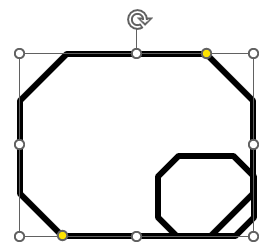
I don’t want this. I want the chamfers to stay the same size as the previous object, but manually scaling the chamfers back to the correct size is both imprecise and annoying.
How can I either:
- Pin the chamfer size so they don’t scale when the shape is resized?
- View and set the shape’s chamfer size numeric property to the exact size as the original object?