For some reason, on my (fully-updated) Windows 10 machine, a lot of app icons in the start-menu search experience have changed to all be the same, as shown here:
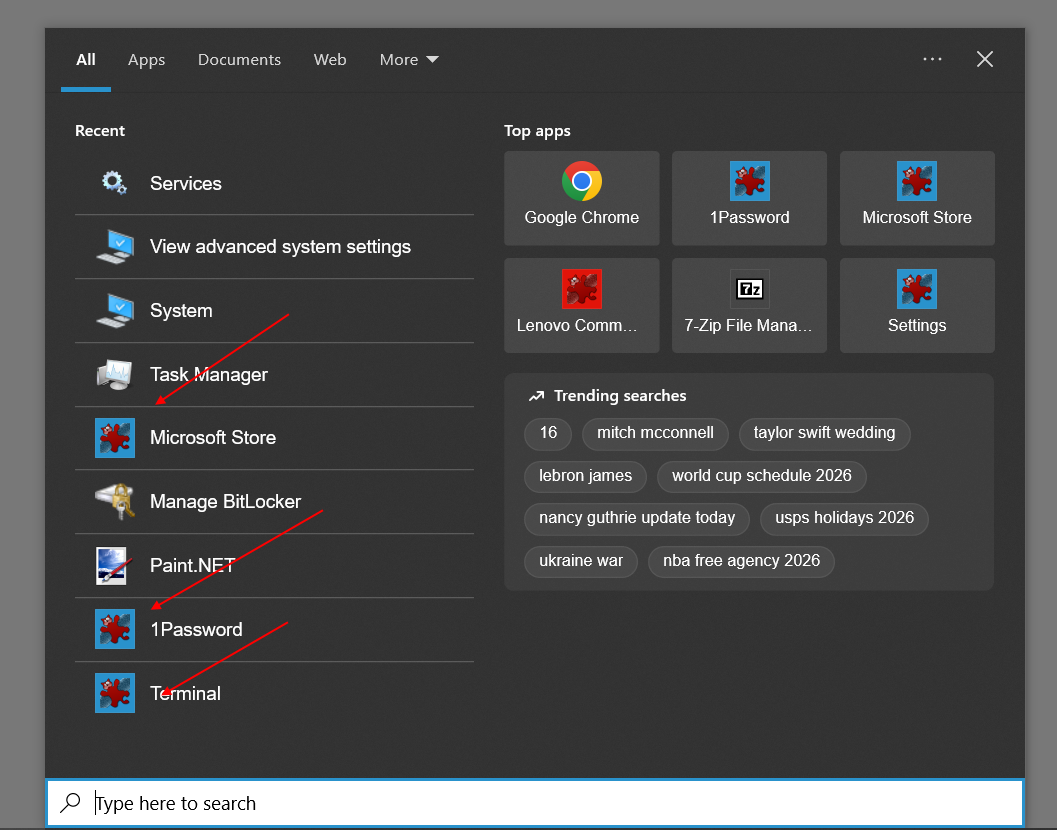
The icon in question is of an app that I did have installed when they changed, but they remain this way even after uninstalling the app. I’ve tried deleting several different things, and none have worked:
%LOCALAPPDATA%\Packages\Microsoft.Windows.Search_cw5n1h2txyewy\LocalState\AppIconCache\%LOCALAPPDATA%\IconCache.db%LOCALAPPDATA%\Microsoft\Windows\Explorer\iconcache*%LOCALAPPDATA%\Microsoft\Windows\Explorer\thumbcache*
I will note that some of the affected icons seem to be for applications I’ve installed using winget or the Microsoft Store, but it’s not entirely consistent (note “Settings” in the screenshot above).
I don’t know why this has happened, or how to fix it. Can anyone explain what’s going on and what I can do about it? Thanks!
