Starting from 2026-11-23 I started having green checkmarks over all of my desktop icons on my Windows 10 IoT Enterprise LTSC machine (see picture below).
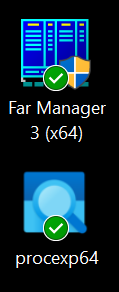
From reading the forums, I have learned that these checkmarks are to signal that OneDrive is synchronizing these shortcuts with the cloud. But here is the kicker:
- I have OneDrive thoroughly uninstalled long time ago (and I just checked, it is not running and remains uninstalled),
- I log into Windows using local account,
- I don’t even have a Microslop account to sync with.
So it seems like some sort of newly introduced bug. I was suspecting this is because of November update, but it was delivered on November 15, so why did it all start on 23rd? Is anyone else experiencing the same?