After installing Microsoft’s PowerToys in Windows 11, at every boot, an error dialog box appears
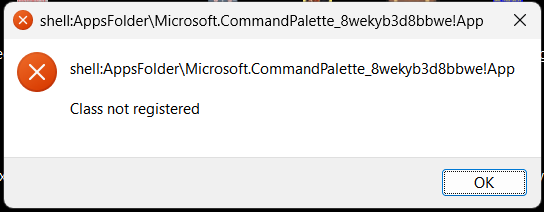
to warn me a class has not been registered.
Uninstalling PowerToys and reinstalling it does not solve the problem.
I see here similar problems have been solved with
{Start}{Run} https://regsvr32 NAMEOFDLL
but I don’t know which DLL or other executable should be specified for the Microsoft CommandPalette PowerToy.
How do I remove this error dialog box?
