I’ve been trying to convert my boot drive from MBR to GPT in order to upgrade to Windows 11 because of the W10 EoL, and realized after some research that having my system in a GPT format would be required to do that.
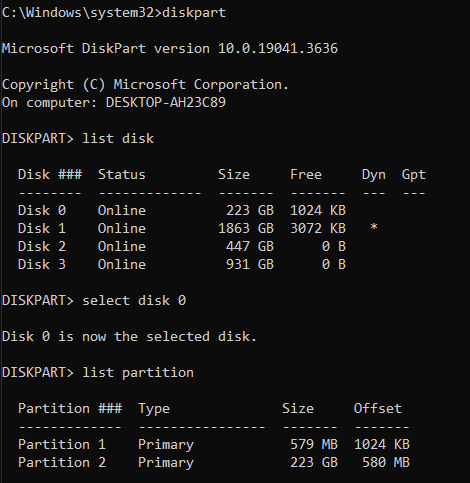
I have been trying to do so using mbr2gpt.exe and guides. My issue is that the error: ValidateLayout: Wrong boot partition count, expected 1 but found 2. keeps appearing in the logs. However, there arent 2 partitions to be found, at least not in Disk Manager, or when using diskpart in cmd. At first there was the recovery partition, which after I determined it was safe to delete did so.
Full log:
2025-07-15 16:46:49, Info MBR2GPT was explicitly asked to run in full OS mode.

2025-07-15 16:46:49, Info MBR2GPT: Attempting to validate disk 0

2025-07-15 16:46:49, Info MBR2GPT: Retrieving layout of disk

2025-07-15 16:46:49, Info MBR2GPT: Initial partition information

2025-07-15 16:46:49, Info ===========================================================

2025-07-15 16:46:49, Info Partition layout for disk: 0

2025-07-15 16:46:49, Info Partition style : MBR

2025-07-15 16:46:49, Info MBR signature: 2892469094

2025-07-15 16:46:49, Info Number of partitions : 3

2025-07-15 16:46:49, Info ===================PARTITION===============================

2025-07-15 16:46:49, Info Number: 1

2025-07-15 16:46:49, Info Type: 7

2025-07-15 16:46:49, Info Boot: Yes

2025-07-15 16:46:49, Info Recognized: Yes

2025-07-15 16:46:49, Info Style: 0

2025-07-15 16:46:49, Info Offset: 1048576

2025-07-15 16:46:49, Info Length: 607125504

2025-07-15 16:46:49, Info Volume: \?Volume{ac679366-0000-0000-0000-100000000000}

2025-07-15 16:46:49, Info Drive: None

2025-07-15 16:46:49, Info NT Path: DeviceHardDisk0Partition1

2025-07-15 16:46:49, Info ===================PARTITION===============================

2025-07-15 16:46:49, Info Number: 2

2025-07-15 16:46:49, Info Type: 7

2025-07-15 16:46:49, Info Boot: Yes

2025-07-15 16:46:49, Info Recognized: Yes

2025-07-15 16:46:49, Info Style: 0

2025-07-15 16:46:49, Info Offset: 608174080

2025-07-15 16:46:49, Info Length: 238891407872

2025-07-15 16:46:49, Info Volume: \?Volume{ac679366-0000-0000-0000-402400000000}

2025-07-15 16:46:49, Info Drive: C:

2025-07-15 16:46:49, Info NT Path: DeviceHardDisk0Partition2

2025-07-15 16:46:49, Info ===================PARTITION===============================

2025-07-15 16:46:49, Info Number: 3

2025-07-15 16:46:49, Info Type: 39

2025-07-15 16:46:49, Info Boot: No

2025-07-15 16:46:49, Info Recognized: Yes

2025-07-15 16:46:49, Info Style: 0

2025-07-15 16:46:49, Info Offset: 239500001280

2025-07-15 16:46:49, Info Length: 554696704

2025-07-15 16:46:49, Info Volume: \?Volume{ac679366-0000-0000-0000-50c337000000}

2025-07-15 16:46:49, Info Drive: None

2025-07-15 16:46:49, Info NT Path: DeviceHardDisk0Partition3

2025-07-15 16:46:49, Info ===========================================================

2025-07-15 16:46:49, Info ESP partition size will be 104857600

2025-07-15 16:46:49, Info MBR2GPT: Validating layout, disk sector size is: 512 bytes

2025-07-15 16:46:49, Error ValidateLayout: Wrong boot partition count, expected 1 but found 2.

2025-07-15 16:46:49, Error Disk layout validation failed for disk 0

2025-07-15 16:49:45, Info MBR2GPT was explicitly asked to run in full OS mode.

2025-07-15 16:49:45, Info MBR2GPT: System disk number is 0

2025-07-15 16:49:45, Info MBR2GPT: Attempting to validate disk 0

2025-07-15 16:49:45, Info MBR2GPT: Retrieving layout of disk

2025-07-15 16:49:45, Info MBR2GPT: Initial partition information

2025-07-15 16:49:45, Info ===========================================================
I cant seem to find anybody else with this problem, as others have 0 partitions when it expected 1. From the Offset in partition 3 it looks roughly like where the recovery partition was, so is it a ghost partition?
Dont know wheter this is relevant, but I did have 2 old versions of Win7 on my hard drive (dont know how, but since 2023 every time i boot up it let me select either Win10 or the other 2). It was partitioned into four and i deleted the parts which were not used in years and that got rid of one of the installations.
cant post images so heres the links to the screenshots.
diskpart in cmd screenshot
Disk Managment screenshot