‘DummyConfigurations’ contains my filterable dataset
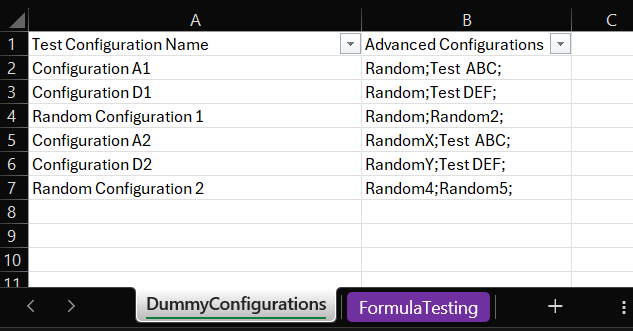
I filter ‘DummyConfigurations’!$B1:$B”&COUNTIF(DummyConfigurations!A:A,”<>”) by each semicolon delimited text (including the semicolon) in ‘FormulaTesting’B2, and return the filtered results from DummyConfigurations!A:A.
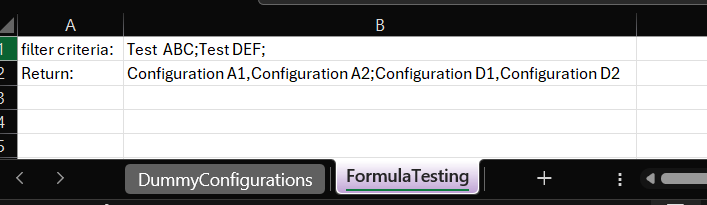
I would ideally like to return the text in the format in cell B2. i.e. Matches of each individual filter criteria separated by commas, and matches of the different filter criteria separated by semicolons
What I’ve so far managed is to return each filtered match but not in the order of the original filter lookup.

=FILTER(INDIRECT("'DummyConfigurations'!$A1:$A"&COUNTIF(DummyConfigurations!A:A,"<>")),BYROW(ISNUMBER(SEARCH(TEXTSPLIT(LEFT(B1, LEN(B1) - 1),";"),INDIRECT("'DummyConfigurations'!$B1:$B"&COUNTIF(DummyConfigurations!A:A,"<>"))))*1,SUM),"")
This is because I’m returning a two column Boolean (in the case of two filter criteria as shown) then I’m summing the columns to create one Boolean column which the filter function then uses.

However, this is then no longer in the order of the filter lookup. If I was able to do the filter by each boolean column separately and return an array of matches for each boolean column separately, then I could do a array to text of the result with the comma and semicolon delimiters for rows and columns respectively

![How do I prevent an exe and Powershell on Windows / PC to stop running altogether? [closed]](https://www.rubin.com.np/wp-content/themes/customizr/assets/front/img/thumb-standard-empty.png)
