Lately, I’m using MySQL Workbench a lot, so I’m trying to speed up my workflow when working with it.
I edit data in the results tabs very often, using the Result Grid or the Form Editor, and found annoying the process of having to press the Apply button using the mouse every time I want to commit the changes.
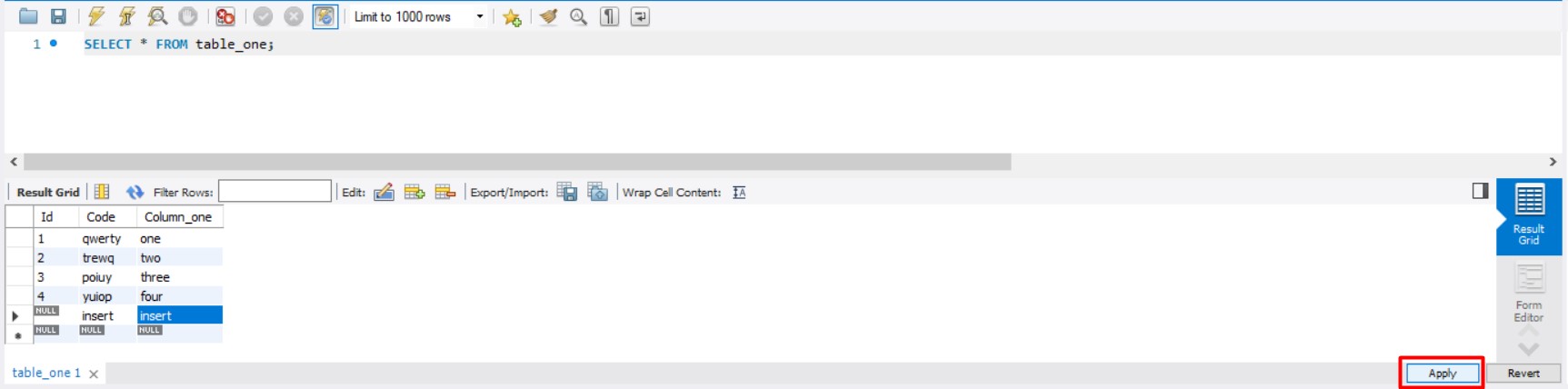
For now, I disabled Confirm Data Changes option in Preferences > SQL Execution to make the process a bit faster, but I would like to avoid the button clicking.
The ideal option would be stablishing a shortcut, but it seems like the Apply button is not one of the selected functions to have one, or at least I couldn’t find it in the MySQL Workbench Keyboard Shortcuts list.
I read how to edit main_menu.xml for customizing existing shortcuts, but it is it: editing existing ones. I’m not sure if it would be possible to add one new shortcut to associate it with the Apply button from here.
There is another question on this topic already in StackOverflow, but it is from 2014, and hadn’t other answers than “request the feature” (not a bad idea, actually, but I wouldn’t like to have to wait for that update). Since the other question is “old” (things may have changed in some way) and it hadn’t a very helpful conclusion, I’m asking about it again.
Also, as a difference from this previous question, I’m interested not only on a possible shortcut, but on some other, maybe more technical, approaches that could do the thing too. I’m not an very experienced developer, so I can’t precise this last part very much, as I lack knowledge on how to modify a program more than itself allows you to.
Any ideas on how to apply this changes more directly?
