I have recently switched from Windows 10 to Windows 11 and have started experiencing memory errors while using various applications including as Chrome, audio applications, and especially Firefox.
Like many other users, using a paging file is currently not an option in my use case. I have the windows paging file (virtual memory settings) disabled for various reasons, mainly the various security risks that come with running the paging file. These security risks are explained partly in the links below, and are briefly summarized as follows:
When using an encryption solution (native, eg EFS, or non-native eg. Veracrypt), normally encrypted data including unhashed passwords and other sensitive data can potentially be written to the paging file in unencrypted form. This paging file can then potentially be accessed by a malicious party and this information extracted.
https://www.techtarget.com/searchenterprisedesktop/tip/Windows-pagefile-security-risks-and-how-to-avoid-them
https://www.truecrypt71a.com/documentation/security-requirements-and-precautions/data-leaks/paging-file/
https://wiki.sei.cmu.edu/confluence/display/c/MSC18-C.+Be+careful+while+handling+sensitive+data%2C+such+as+passwords%2C+in+program+code
Symptoms are the following:
-Popups from applications of the type “Out of memory”; “The paging file is too small for this operation”, etc.
-Occasional events in the event viewer, eg:
These problems were not happening with Windows 10, where I had the paging file/virtual memory disabled also.
I wish to troubleshoot the cause of these errors, which should not by design be happening as far as my understanding of what virtual memory is supposed to be used for goes.
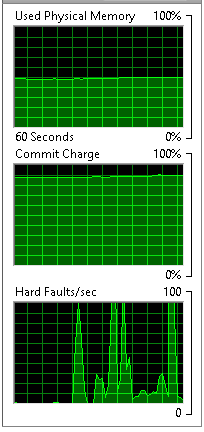
Available memory never falls below 5 GB (out of 16 GB total) when these errors occur:
Note:
-Encrypting the paging file or entire Windows OS system drive is currently not an option in my use case
-I am aware by having the paging file disabled crash dumps are not written.
![I want to construct a sentence randomly [closed]](https://www.rubin.com.np/wp-content/themes/customizr/assets/front/img/thumb-standard-empty.png)