I have a Windows 10 with WSL2 inside.
Whenever I create a symlink in the linux side, I expect it to be seen from the windows side (as it happens for example in a server with samba). But I cannot manage to see it from windows.
I would appreciate any help in seeing the linux symlinks in the windows side
Practical example of what I do
In linux bash, it works
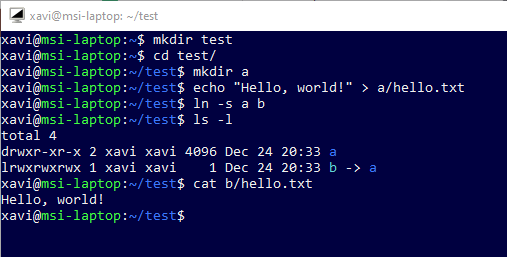
If I create a file named a/hello.txt and symlink b pointing to a, I can cat b/hello.txt and see it:
mkdir test
cd test/
mkdir a
echo "Hello, world!" > a/hello.txt
ln -s a b
ls -l
# See b pointing to a in the output
cat b/hello.txt
# See the file's contents in the output
In gitbash, broken
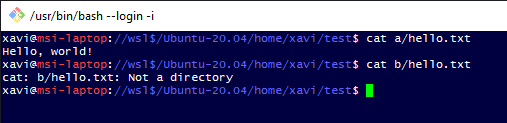
When I go to the windows side, the symlink is broken.
In gitbash:
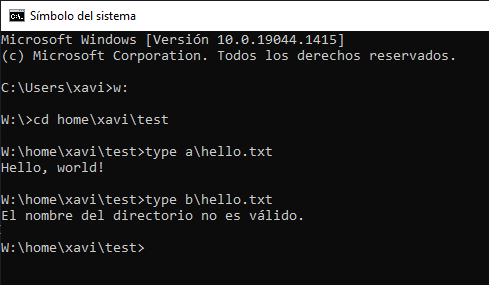
In CMD, broken
In CMD (UNC \wsl$Ubuntu-20.04 mounted in W:):
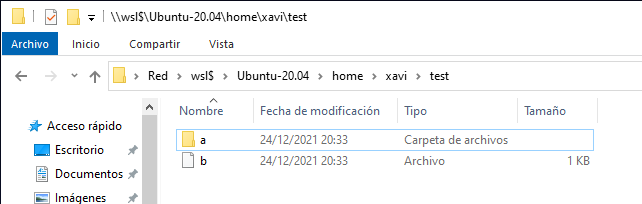
In the file explorer, broken
In the Windows Explorer b appears as a file, not a folder:
Question
What am I doing wrong? What should I do to see b as a browsable folder in the windows side?
PD: Relates to this (unsolved) question in SO: https://stackoverflow.com/questions/64489501/wsl2-linux-relative-symlinks-broken-when-accessed-from-windows-only-for-the – The question was closed last month and suggested to be moved to SuperUser.