
I’ve enabled single-store mode and created a new product using the async/bulk/V1/products functionality (MagentoAsynchronousOperationsModelMassSchedule). Initially, all attributes of this product are saved under store_id = 0 (admin store). When editing the product via the admin panel, the attribute values are appropriately updated in the respective tables (e.g., varchar) for the […]
Magento
9158 posts

On our productpage we would like to place the two default div’s product.info.main and product.info.media into a new div. How can we achieve this by updating the catalog_product_view.xml? In this case we would like to place only the product media and product-info-main into a new div. So the <div class="column […]
When I run the following commends, theme JavaScript file broken php bin/magento setup:upgrade php bin/magento cache:flush php bin/magento cache:clean Broken files (net::ERR_ABORTED 404 (Not Found)): /pub/static/version1697560192/frontend/Smartwave/porto/en_US/js/jquery.sticky.min.js /pub/static/version1697560192/frontend/Smartwave/porto/en_US/js/jquery.lazyload.js pub/static/version1697560192/frontend/Smartwave/porto/en_US/StripeIntegration_Payments/js/stripe_payments_express.js Notes: Magento ver. 2.4.1 Application mode is default.
How can I set server status 404 with vue component page_not_found? Now server status 404 only with dinamic catalog undefined pages.
I have just upgraded my magento from 2.4.0 to 2.4.6 and also upgraded my php 7.4 to 8.2. All the commands are running fine but while reindexing i am getting this error and on frontend also. Can anyone tell me why this error is showing on frontend Type Error occurred […]
I’ve been trying to put a comma between the two links but there’s a permanent space, the space is fine with words, but not so well with the comma. For example, I’ll get “This , this and this” instead of “This, this and this” The code for the widgets looks […]
This is the function that captures some data protected function captureRequestData(RequestInterface $oRequest, $aPostParams) { return [ 'request' => [ 'status' =>'pending', 'params' => json_encode($aPostParams), 'endpoint' => $oRequest->getRequestUri(), 'view' => json_encode($oRequest->getHeaders()->toArray()), 'event' => $this->_oEventobserver->getEventName(), 'data' => json_encode($this->_oEventobserver->getEventData() ), 'ip' => $oRequest->getClientIp(), 'session' => $this->_oCustomerSession->getCustomer()->getName(), 'customer_id' => $this->_oCustomerSession->getCustomerId(), 'created_at' => date('Y-m-d H:i:s'), […]
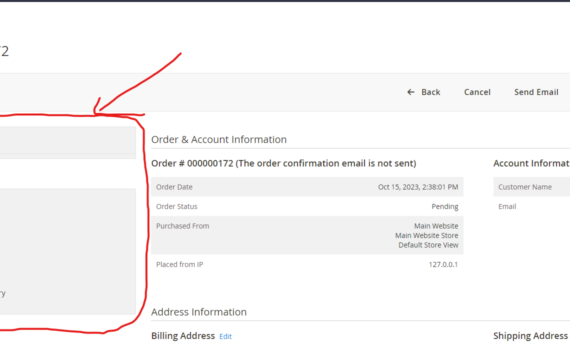
I want to remove everything which is inside the red part. All area under “Order View” include “Order view” it self. After removing this part the detail of order should start from where the “Order view” currently present. I mean to say that “Order & Account Information” should start from […]
I have created one custom command. That command is used when i need to generate some specific file. When i run setup:upgrade command then i give me error like “Area code not set“. Below is code example. $this->state->setAreaCode(Area::AREA_FRONTEND); if ($input->getOption(self::GENERATE_NEW_MENU)) { $output->writeln('<info>Generating static navigation:<info>'); $generated = $this->abcModel->generateNavigation(1); if ($generated) { […]