
I want to customize the nav-section component, like changing data, adding more links, and customizing its styling on hover, but I cannot find its phtml or markup file in the Magento theme. To my knowledge, to customize that component, I just need to find the file, copy it, paste it […]
Magento
8281 posts
Recently I saw Setup/Patch/Data with 'type' => 'static' $eavSetup->addAttribute( MagentoCatalogModelProduct::ENTITY, 'attribute_code', [ 'group' => 'General', 'label' => 'Product Type ID', 'type' => 'static', 'input' => 'select', 'source' => VendorModuleModelSourceSource::class, 'required' => false, 'sort_order' => 1, 'global' => Attribute::SCOPE_GLOBAL, 'used_in_product_listing' => false, 'visible_on_front' => false, ] ); How does this static […]

I ave created a field for adding custom price on the product and now I want to update the price for the particular item on shopping cart page. How can I do that?
I want to add unsubscribe link in footer of all my email templates such as order confirmation, order delivered, order cancelled. I tried all the solutions from the internet. but nothing works fine. How can i add unsubscription link to all my email templates?
When I click on Vendor Products->Pending Products/Approved Products/All Products showing this error message
I’ve successfully added a total_savings block to my theme. It works well by doing the calculation in the phtml file. themeMagento_Checkoutlayoutcheckout_cart_index.xml: <?xml version="1.0"?> <page layout="1column" xmlns:xsi="http://www.w3.org/2001/XMLSchema-instance" xsi:noNamespaceSchemaLocation="urn:magento:framework:View/Layout/etc/page_configuration.xsd"> <body> <referenceContainer name="checkout.cart.totals.container"> <block class="MagentoFrameworkViewElementTemplate" name="checkout.cart.total.savings" after="checkout.cart.totals" template="Magento_Checkout::total_savings.phtml" /> </referenceContainer> </body> </page> But it doesn’t reload when editing the quantities of products, removing […]
I need to delete all the stores from Store Locator but when I asked development team, they told me this can be done only manually.
Im customizing the checkout of Magento and having some issue in html templates. I copy the cart-items.html from the magento-checkout module in my theme but, when i change the template structure the js stop running and no one error in the console. <div class="block items-in-cart" data-bind="mageInit: {'collapsible':{'openedState': 'active', 'active': isItemsBlockExpanded()}}"> […]
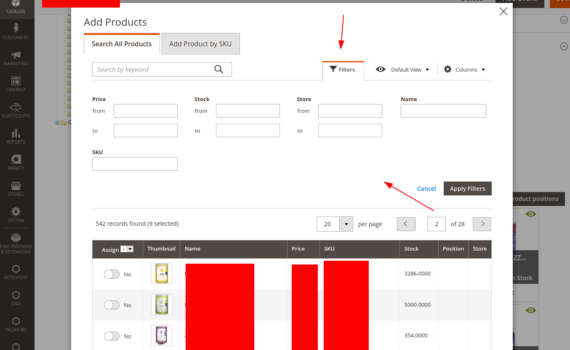
I need to add new filters, in the product search to add in the category, the module that creates the component is MODULE-VISUAL-MERCHANDISER, what is the best way to do this? And is it possible to add new filters in this component? follow print of the place