
I’ve question in the link below : Get grand total and customer data variables Now I solved the issue by using object manager directly, but I found too many people said it’s not recommended ! Could you please tell me why ? also is there another way to use ?
Magento
8281 posts
I am creating a custom product import function. While importing the csv I am getting an error Please enter a correct entity model. This is what I have done ModelImportProductImportProductImport.php <?php namespace TtmHelloPrintModelImport; use Exception; use MagentoFrameworkAppConfigScopeConfigInterface; use MagentoFrameworkAppResourceConnection; use MagentoFrameworkExceptionLocalizedException; use MagentoFrameworkStdlibStringUtils; use MagentoImportExportModelImport; use MagentoImportExportModelImportAbstractEntity; use MagentoImportExportModelImportErrorProcessingProcessingErrorAggregatorInterface; use […]
I have created some buttons on catalog product admin page. I would like to group them in a dropdown (split) button like the Add Product button. Can you please help? My product_listing.xml below <?xml version="1.0" encoding="UTF-8"?> <listing xmlns:xsi="http://www.w3.org/2001/XMLSchema-instance" xsi:noNamespaceSchemaLocation="urn:magento:module:Magento_Ui:etc/ui_configuration.xsd"> <argument name="data" xsi:type="array"> <item name="buttons" xsi:type="array"> <item name="productssync" xsi:type="array"> <item name="name" […]
We have a live production Magento ver. 2.4.2-p1 with 2224 products but have a lot of problems which stem from me using the official Magento Migration Tool to migrate from Magento 1.x. Because of this, I have decided to built a new Magento 2.4.4 website and instead of using the […]
I’m using Magento 2.4 and I’m trying to get grand total and customer data variables to be inserted to Google tracking code. I’ve followed the link below to create custom module to call $block->getGrandTotal but it’s not work ! https://magento.stackexchange.com/a/116922/105485 This is google code which I’ve to fill it with […]
I’m trying to add tracking code to my onepage success page. I’ve created layout and created success.phtml to my custom theme. app/design/frontend/my_theme/Magento_Checkout/layout/checkout_onepage_success.xml <page xmlns:xsi="http://www.w3.org/2001/XMLSchema-instance" layout="1column" xsi:noNamespaceSchemaLocation="urn:magento:framework:View/Layout/etc/page_configuration.xsd"> <head> <script src="module-checkout::templates/success.phtml"/> </head> app/design/frontend/my_theme/Magento_Checkout/templates/success.phtml my tracking code Everything fine but the tracking code didn’t appear when I click view page source in my […]
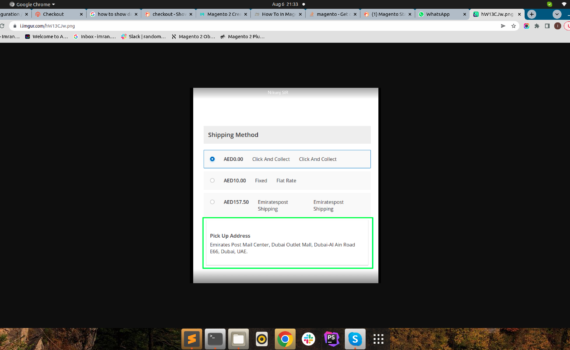
I have created system.xml file and passed value from config.xml file want to show that value message on checkout page.like this
Previously, we used the following module to load the email variable with a custom CreatedAt value. Because this is deprecated, it will not work anymore (https://devdocs.magento.com/guides/v2.4/frontend-dev-guide/templates/template-email-migration.html). How can we modify the following, to keep using this custom CreatedAt from Magento 2.4.3-p2? app/code/Mago/Delivery/registration.php <?php MagentoFrameworkComponentComponentRegistrar::register( MagentoFrameworkComponentComponentRegistrar::MODULE, 'Mago_Delivery', __DIR__ ); app/code/Mago/Delivery/etc/module.xml <?xml […]
Magento 2.3.7, PHP 7.4.30 I installed the VES Page Builder extension (downloaded file from land of coder) manually, according to their readme: Upload module files in the module packages in to folder: app/code/Ves/All, app/code/Ves/Setup, app/code/Ves/BaseWidget, app/code/Ves/PageBuilder Then run commands php bin/magento setup:upgrade --keep-generated php bin/magento setup:static-content:deploy -f php bin/magento cache:clean […]