I’m trying to convert text editor content to html, There are lots of solution over the internet to convert wysiwyg text to html but in my case the text is not coming from the wysiwyg, it’s coming from the contentful(cms) by calling the API. Text coming from the API (Text […]
Magento2
7842 posts

I Want to create two dropdown product attributes. Depending on the first dropdown send dropdown option will be display in product admin edit page.(not need it in frontend) e.g : ABC attribute (options 1,2,3,4,5) now EFG attribute (option will be like If abc select 1 then (x,y,z), If abc select […]
define([ 'jquery', 'uiComponent', 'Magento_Customer/js/customer-data', 'domReady' ], function ($, Component, customerData) { 'use strict'; return Component.extend({ /** @inheritdoc */ initialize: function () { var _this = this; this._super(); this.wishlist = customerData.get('wishlist'); console.log(this.wishlist); this.wishlist.subscribe(function(newValue) { _this.decorateItems(); }); _this.decorateItems(); }, decorateItems: function() { var items = this.wishlist().items; if (typeof items === 'undefined' || […]
I don’t use MSI and i want so that swatches that are not available are hidden on the configurable product. How can this be done?
I have getting error Invalid address id at add to cart , issue with only migration customer Any solution to resolve this issue https://prnt.sc/7zG0P0KEeHRW
In my master.html for a custom pagebuilder component, the “data” binding is not available. I always get an error that it’s undefined in frontend. But it’s working fine in preview.html preview.html (this is working) <div class="pagebuilder-content-type pagebuilder-ls-teaser" event="{ mouseover: onMouseOver, mouseout: onMouseOut }, mouseoverBubble: false" attr="data.main.attributes"> <div if="data.headline.html" class="teaser-headline" html="data.headline.html" […]
I have created a custom page using route and controller.I have some image paths then how can i create slider for using these images
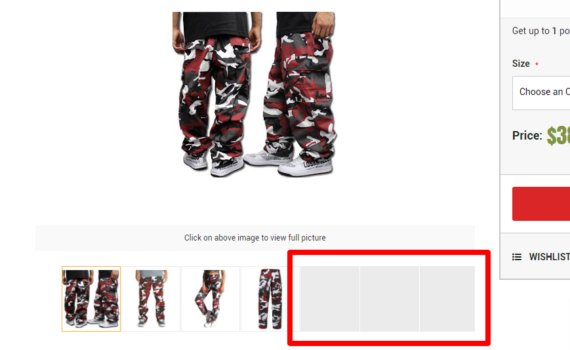
I’m having some problems this slider, all the products that have more than 4 images the others images are not loading and don’t appear any error, but when we open the full image view the images are loaded and it appears in the slide.