OS: Debian GNU/Linux 13 (trixie)
Kernel: 6.12.63+deb13-amd64
KDE Version: plasmashell 6.3.6
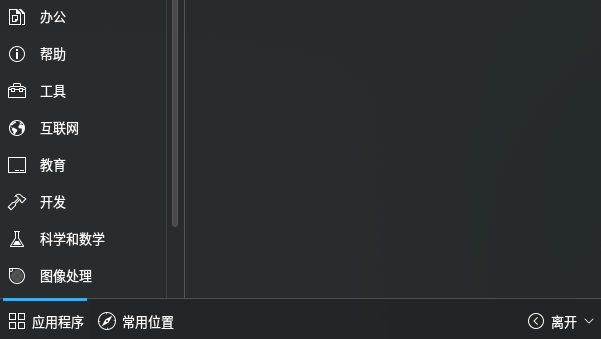
As the title shows, I don’t know why, originally when pressing the ‘win’ key, in the pop-up application launcher, I should be able to see these two buttons, but now, only the ‘Leave’ button remains.
During this period, I basically didn’t touch any KDE-related configuration files.
The only related operation was configuring “VeraCrypt” so that when mounting, there is no polkit popup asking for a password (but unfortunately, my configuration didn’t work, so I deleted the .rule file I created). Of course, I also used visudo, but I also reverted the related editing operations.
I tried it from here
Check if your user is a member of group wheel and create /usr/local/etc/polkit-1/rules.d/40-wheel-group.rules with
polkit.addRule(function(action, subject) {
   if (subject.isInGroup("wheel")) {
       return polkit.Result.YES;
   }
});
But it has no effect.
Additionally, the WIFI-related buttons also do not work properly; they show ‘not authorized,’ so I think it is a permission issue, but I am not sure why.
I want to log in to the desktop as root, but I was not successful (so I haven’t fully confirmed whether it is a permission issue). The method I tried is as follows:
Use sudo vncserver, and then connect with a VNC client (because I have successfully logged in on my desktop before, and also successfully on a debian 13 + KDE 6 VMware virtual machine), but unfortunately, it was just pitch black.
I suspect it might be an issue with my laptop, because my previous KDE settings also had the autostart suddenly disappear (.config/autostart/ files suddenly seemed to be deleted, I don’t know when it happened, I only noticed the files were missing the next time I started the laptop when I found that the applications didn’t autostart).
But my other desktop computer, which is also debian 13 + KDE 6, has never encountered these problems.
What checks should I carry out to prevent these problems from occurring again?
How should I elevate the user’s permissions to restore them to normal?