I set up a new fresh install of Windows 10 on my Laptop. In order to be safe from some problems in the past I wanted to do it right and created a Restore Point. Then changed some stuff, did another restore point. Both with nice descriptions of what changed. So far so good.
Now I remembered that I also want a full backup, so went ahead and used “Backup and Restore (Windows 7)” from Control Panel, did a backup on a separate partition (same disk but dw, I know you should do it on different hardware, but I dont want to defend against disk failure but me messing up settings and such), then set up a backup routine.
New day, I change something else, do a new Restore Point, look up whether everything is there – boom, my restore points are missing! There are three from the Backups with generic description “System Image Restore Point”, but my custom ones are gone (not the new one obviously).
I literally did nothing but what I described up there: change some settings, uninstall and install some stuff, light browsing.
All I find is some advice things I already checked:
Partition C: is “Protection: On”
Disk Space for Restore Points is more than enough (10 GB; current used: 50 MB)
Update: Windows PowerShell (run as Administrator):
PS C:Windowssystem32> Get-ComputerRestorePoint

    CreationTime           Description                    SequenceNumber    EventType         RestorePointType
    ------------           -----------                    --------------    ---------         ----------------
    29/05/2025 19:09:10    Installed: MS Office           10                BEGIN_SYSTEM_C... 16
    29/05/2025 19:35:38    Windows Backup                 11                BEGIN_SYSTEM_C... 15
There are more though:
Restore Point Manager (Win + R > rstrui`) gives:
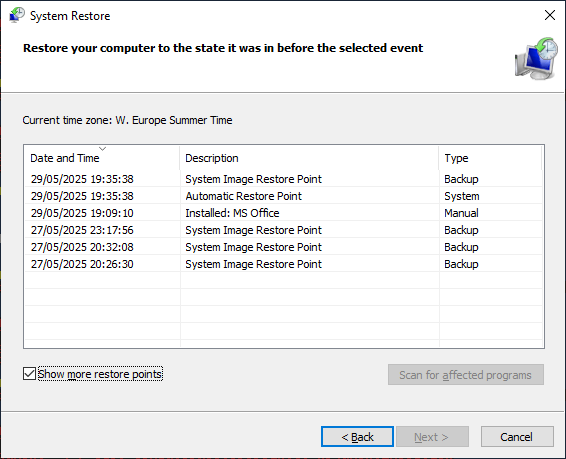
(can’t find a command for “Show more restore points” for PS)
