I have a piece of hardware, a GW Instek Programmable Power Supply, that connects via USB, and should be exposed as a serial port. However, when I plug it in to a Win11 PC, it displays instead as a libusb/WinUSB device, as seen in Device Manager:

After some web searching, I tried installing a FTDI driver, and a WCH driver, both of which were successfully installed, but did not make any difference. I also tried updating drivers manually and through Windows Update, with a similar lack of success.
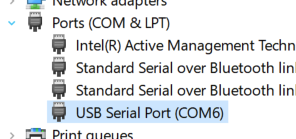
Connecting the same device to a Windows 10 PC, I get the COM port correctly, so I know it is not a problem with the power supply:
Can anyone suggest what my next steps should be?
I tried contacting GW Instek support a few days ago, but have not heard back.