My Windows 11 (V25H2) PC does not show the top option in the explorer menu, like in this pic here:
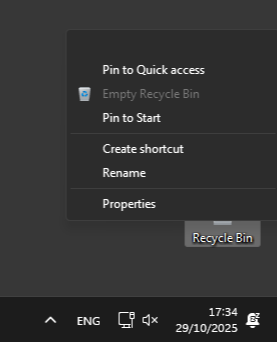
Above “Quick access” there should be the button labeled “Open”. The button still works if clicked, it just does not show it.
I already tried re-enabling the default Win11 context menu, but whenever I click on “Show more options”, the same problem appears.
I noticed it only in the last couple days, so I’m not 100% sure it was the latest update fault.
Does anyone know what the issue is?