Since the last windows/BIOS update (I’m guessing the BIOS one is to blame), my laptop (Lenovo IdeaPad Slim 3 15H) has been throttling the CPU very often.
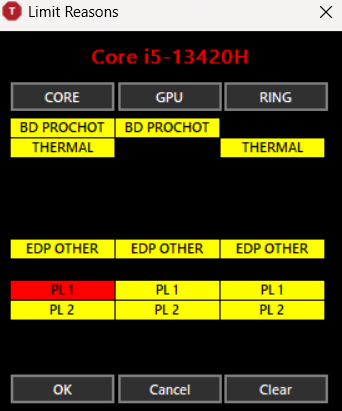
I’ve downloaded ThrottleStop, and while I occasionally get PROCHOT 94°C (even when the laptop isn’t even at 80 degrees), the main culprit (if I understand correctly) seems to be the Core’s PL1, which is often red.
I’ve entered Lenovo’s UEFI, changed the fan setting from silent (I thought at the time it might be an overheating issue). Didn’t see any option there to change the PL1 limits.
Is there anything I can do to reduce this constant throttling?