I cannot figure out how to search through the list (in Column D), under Plan Name to find the unique name and then populate a list under B2 (where the result box is).
What is the best way to accomplish this?
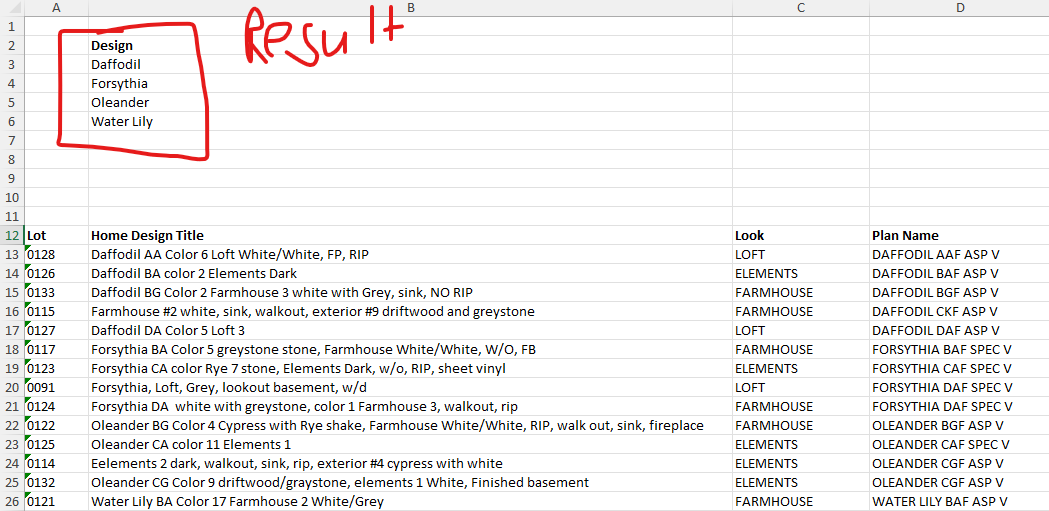
| Lot | Home Design Title | Look | Plan Name |
|---|---|---|---|
| 0128 | Daffodil AA Color 6 Loft White/White, FP, RIP | LOFT | DAFFODIL AAF ASP V |
| 0126 | Daffodil BA color 2 Elements Dark | ELEMENTS | DAFFODIL BAF ASP V |
| 0133 | Daffodil BG Color 2 Farmhouse 3 white with Grey, sink, NO RIP | FARMHOUSE | DAFFODIL BGF ASP V |
| 0115 | Farmhouse #2 white, sink, walkout, exterior #9 driftwood and greystone | FARMHOUSE | DAFFODIL CKF ASP V |
| 0127 | Daffodil DA Color 5 Loft 3 | LOFT | DAFFODIL DAF ASP V |
| 0117 | Forsythia CA Color 5 greystone stone, Farmhouse White/White, W/O, FB | FARMHOUSE | DAFFODIL BAF SPEC V |
| 0123 | Forsythia CA color Rye 7 stone, Elements Dark, w/o, RIP, sheet vinyl | ELEMENTS | FORSYTHIA CAF SPEC V |
| 0091 | Forsythia, Loft, Grey, lookout basement, w/d | LOFT | FORSYTHIA DAF SPEC V |
| 0124 | Forsythia DA white with greystone, color 1 Farmhouse 3, walkout, rip | FARMHOUSE | FORSYTHIA DAF SPEC V |
| 0122 | Oleander BG Color 4 Cypress with Rye shake, Farmhouse White/White, RIP, walk out, sink, fireplace | FARMHOUSE | OLEANDER BGF ASP V |
| 0125 | Oleander CA color 11 Elements 1 | ELEMENTS | OLEANDER CAF SPEC V |
| 0114 | Eelements 2 dark, walkout, sink, rip, exterior #4 cypress with white | ELEMENTS | OLEANDER CGF ASP V |
| 0132 | Oleander CG Color 9 driftwood/greystone, elements 1 White, Finished basement | ELEMENTS | OLEANDER CGF ASP V |
| 0121 | Water Lily BA Color 17 Farmhouse 2 White/Grey | FARMHOUSE | WATER LILY BAF ASP V |