This is my drive status on DiskGenius:
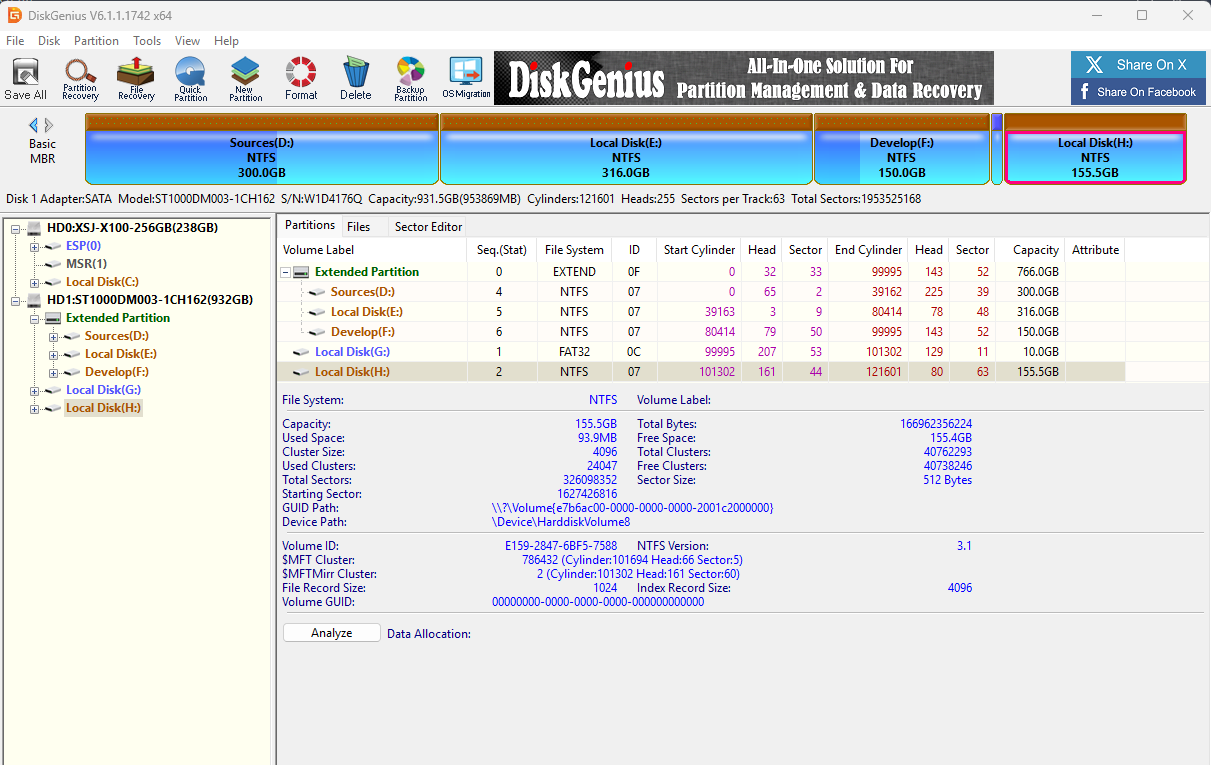
I am currently using Windows 11 installed on my SSD. I also have a separate HDD with an empty partition (Drive H:), and I would like to install Ubuntu lastest version (25.10) on that HDD to set up a dual boot system with Windows 11.
My goals:
- Keep Windows 11 on the SSD
- Install Ubuntu on the HDD (Drive H:)
- Be able to choose the operating system at boot (dual boot)
I would like guidance on the correct installation steps to avoid overwriting Windows or the SSD bootloader.
Specific questions:
- During Ubuntu installation, which installation type should I choose?
- Should I manually create partitions on Drive H: before installing?
- Where should I install the GRUB bootloader — on the SSD or the HDD?
- Is there any risk that Ubuntu installation will overwrite the Windows bootloader?
- Are there any recommended partition sizes for root, swap, and home on the HDD?
I tried to install like this.
- extract iso file to drive G.
- Restart windows 11 and access “try ubuntu and install”
- I set drive partition as H in EXT4 format. and mount “/”.
- and then tried to set boot partition at bottom.
- but only SSD is activated, HDD is not.
- also, while installing ubuntu. it takes longer and error occurred.
I would appreciate step-by-step guidance to safely install Ubuntu on the HDD while keeping Windows 11 intact.
