Occasionally I’m using Duck AI for help.
Once finished, I’d like to save the session (text plus formatting, etc).
- When I try “Print To PDF” in Edge, I only get an empty page, or some tiny textbox only.
- When I try to make a screenshot of the whole page (not just the visible window), I
the screenshot contains the visible window only.
I’m wondering: Is it a bug somewhere, or does the DuckAI page make it so hard to save the session output?
DuckAI offers a “Download session”, but that’s plain text only, and a lot or formatting is lost.
How can I save the session “as shown”?
Example:
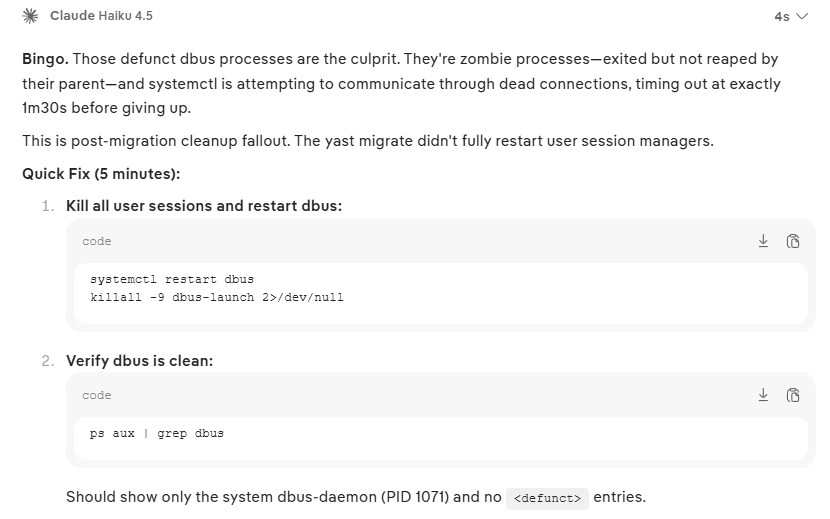
The corresponding text in the downloaded session looks like this:
This is a classic "Moderate Effort" troubleshooting path - should take 5 minutes.

Let me ask for confirmation and provide the fix.**Bingo.** Those defunct dbus processes are the culprit. They're zombie processes—exited but not reaped by their parent—and systemctl is attempting to communicate through dead connections, timing out at exactly 1m30s before giving up.

This is post-migration cleanup fallout. The yast migrate didn't fully restart user session managers.

**Quick Fix (5 minutes):**

1. **Kill all user sessions and restart dbus:**
   ```
   systemctl restart dbus
   killall -9 dbus-launch 2>/dev/null
   ```

2. **Verify dbus is clean:**
   ```
   ps aux | grep dbus
   ```
   Should show only the system dbus-daemon (PID 1071) and no `<defunct>` entries.