I have used a spare 8-wire network cable (approx 12m length) to connect a USB mouse + keyboard to a Win11 PC at the other end of my home. The PC is linked to my TV through an HDMI cable and my intention is to operate the PC sitting on my couch in front of the TV.
Here are the connections between the two devices and the color-coded network cable wires.
.
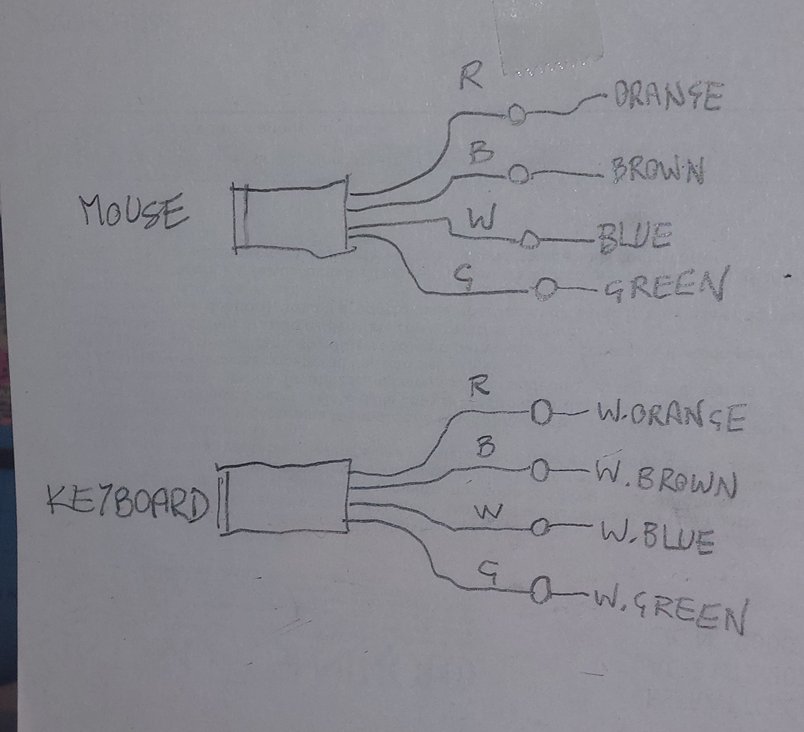
I am doing this very naively, I am ignoring the USB cable shielding and (not unsurprisingly) the result is not entirely satisfactory:
- The keyboard connects to the PC and it works 100% in every situation.
- The mouse works correctly when the keyboard is not plugged in.
- When the keyboard is plugged in, the mouse behaves erratically.
I assume the signals interfere with each other, maybe more so because I am using intertwined couples (e.g. orange + white-orange) to transfer different signals.
Plugging & unplugging the keyboard is tiresome. What could I do to improve the situation
I am hoping someone on this site can see exactly what is wrong in my hardware solution and suggest maybe a different wiring connection.
I could obviously use two long USB cables with their shieldings alright, but I am glad I could hack in that old network cable and I am curious whether anyone could teach me something about all this.