
Learn how to launch a WordPress blog with this step-by-step guide covering domain selection, hosting setup, theme customization, essential plugins, and SEO optimization. Continue reading How To Begin A WordPress Blog: A Step-By-Step Guide For Beginners on SitePoint.
Daily Archives: April 17, 2025
9 posts

Read Top 9 WordPress Themes To Use in 2025 and learn WordPress with SitePoint. Our web development and design tutorials, courses, and books will teach you HTML, CSS, JavaScript, PHP, Python, and more. Continue reading Top 9 WordPress Themes To Use in 2025 on SitePoint.

I am having a module which gives the ability to cart with checkbox to select which items you want to proceed to checkout. Although I have an issue with Observer event and always in order I get all items of the cart with totals of the selected items for checkout. […]
I’m currently facing an issue with Elasticsearch not working properly on my Magento 2.0 website. I’ve set up Elasticsearch as the default search engine from the Magento admin panel, and I’ve double-checked that the service is running on my server (Elasticsearch version 2.x – compatible with Magento 2.0). However, the […]
So I’ve been trying to root my phone, I have the image, however I do NOT have administrator permissions on my windows environment and no longer have the email or phone it was attached to. However I did figure out how to bypass the UAC prompt for an app which […]
The problem I am using a (paid) VPN, namely, ProtonVPN. The goal is to be able to torrent, using (in this specific case) the qBittorrent client. As a “convenience” feature, I’d like to have the tunnel be used only by programs which “need it”, and use the usual interface for […]
I have a display issue when I run VSCode and then split screen the Live Server display beside it. This issue has also become persistent with Discord. I have an i7 octacore 24 GHz CPU and an NVIDIA GeForce 3060 GPU. The issue is when I have my code opened […]
I am trying to record my game screen on Win11 using ffmpeg using the following: ffmpeg -f gdigrab -framerate 20 -c:v libx264rgb -crf 0 -preset ultrafast -color_range 2 -offset_x 0 -offset_y 0 -video_size 1920x1080 -i desktop -show_region 1 C:Action!Videooutput.mkv I get an error message after the ffmpeg info that says: […]
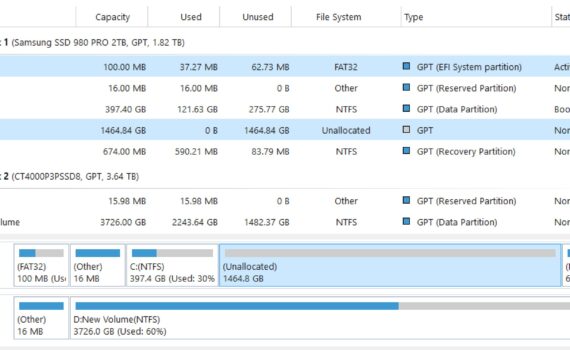
I am trying to move unallocated space from my C drive to my D drive using MiniTool. They are on separate SSDs and I can’t figure out how to move the unallocated space.