Daily Archives: September 19, 2025
10 posts

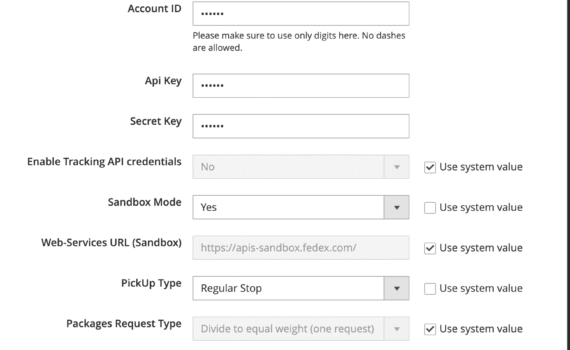
This is a new installation/setup of Mage2 and I am attempting to setup Fedex shipping. The input field for the Fedex meter number is completely missing (even searched the page source for the word “meter”, in case it was collapsed or hidden). Fedex authentication is failing, understandably. The debug info […]

How can I delete a product from category using API? I tried with: rest/V1/categories/&{category_id}/products/&{sku} and usually works fine. But sometimes I get err msg: “The category doesn’t contain the specified product.” I tried POST with the new category links list, but failed. What can I do?
Whilst working with a Magewire component, randomly getting: {"message":"Magewire security vulnerability: Magewire encountered corrupt datan when trying to hydrate the X\Y\Z component. Ensure that the [name, id, resolver and data] of the Magewire component wasn'tn tampered with between requests.","code":500}
Updated issue description: Problem: Persistent Composer install failures when using official Packagist repository Affects both HTTP/1.1 and HTTP/2. Environment: Environment: Docker containers PHP: 8.1 Composer: 2.8.4 Magento: 2.4.7-p7 Errors encountered: curl error 92: HTTP/2 stream 0 was not closed cleanly: INTERNAL_ERROR (err 2) curl error 18: transfer closed with 34 […]
My WiFi router is showing red after I reset it , I was trying to connect a second router when this happened , it was working fine before I did this
I use MS Word for creating exams for my students. Each question is awarded a certain maximum points, which are written inside square parentheses/brackets, e.g.: Q1. What are the reactants in photosynthesis? [2] What I am trying to figure out is this: have Word identify all numbers within square parentheses […]
I bought a new laptop with Windows 11 home edition. How do I bypass connecting to the internet when setting up the laptop? I’ve all 3 but the command prompt isn’t opening. Nothing happens. I’m not getting an error message or anything. Shift + F10 Ctrl + Shift + F10 […]
Today I downloaded MacPorts onto my MacBook Pro. It shows up in the System Info as Command Line Tools for Xcode (ver. 16.2) & Command Line Tools for Xcode 26.0 (ver. 26.0). The Terminal however, didn’t recognize any of the code when I entered it in line-by-line. My goal was […]