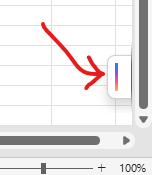
This copilot button is driving me crazy because it overlaps my spreadsheet. I tried right-clicking it and choosing “dock” but this is as “gone” as I can get it.
How can I remove it completely? FWIW I think it should be in the ribbon or up in the title bar (quick access bar) or down in the status bar. But certainly not floating over my document!