I help to manage IT for several companies. We often jump into their various systems via a web browser…typically a Chromium-based browser like Google Chrome, MS Edge, Chromium, etc. We’ll create profiles for each of our tenants. Then, as we work through the day’s tickets, we flip to each tenant via the profile picker and do what we need to do. Creating each profile, over time, is not bad; we can easily do that. However, when an FNG comes aboard or one reloads their computer and it chucks a drive, these profiles need to be created all at once and that’s suboptimal. In Firefox, I can create profiles via the CLI. I tried doing something similar via Chromium’s CLI but it’s not working as I think it should.
Things I’ve tried:
"C:Program FilesChromiumApplicationchrome.exe" --profile-directory="HD"
"C:Program FilesChromiumApplicationchrome.exe" --user-data-dir="Acme" --profile-directory="Acme"
"C:Program FilesChromiumApplicationchrome.exe" --user-data-dir="Acme"
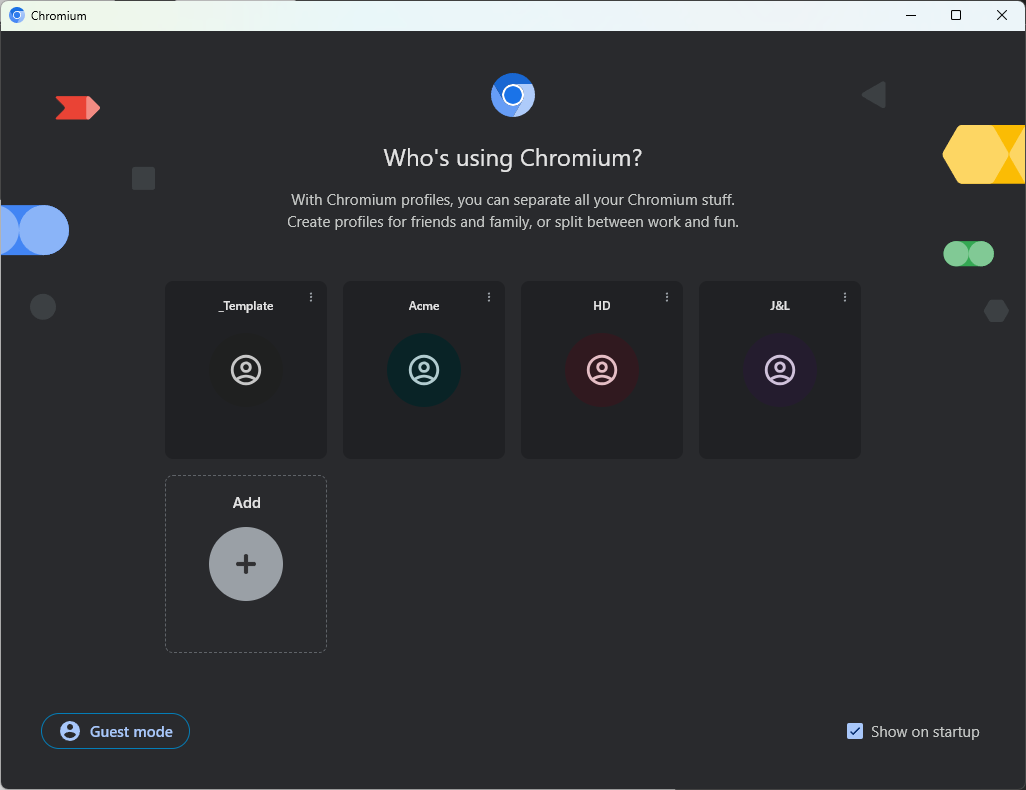
Using the first command shown, I get the folder created with the correct name inside "%LocalAppData%ChromiumUser Data" however, I can’t tell which is which when I look for them in the profile picker. The first one created gives you a Your Chromium entry in the profile picker but subsequent commands will yield Person 1, Person 2, Person 3, etc.

The second and third commands chuck errors about not being able to read or write to a folder but then it still opens Chromium. However, neither an entry in the profile picker nor a folder get created.

What I’d like to see:
Am I doing something wrong or is the functionality just not there with Chromium-based browsers?