Hi here am trying to add a js script to the <head> tag,
methods used
-
Content => Design => Configuration, Now click on the edit link of the current theme and Go to the HTML Head tab and inside scripts and style sheets text-area you can enter your custom script.
-
create an XML file on theme location:
app/design/frontend/packagename/themename/Magento_Theme/layout/default_head_blocks.xml
Created a template file on following location:
app/design/frontend/packagename/themename/Magento_Theme/templates/html/header/head_tags.phtml
<script type="text/javascript">
  console.log("custom head!");
</script>
<script defer>(function (w, d, s, l, i) {
      w[l] = w[l] || []; w[l].push({
        'gtm.start':
          new Date().getTime(), event: 'gtm.js'
      }); var f = d.getElementsByTagName(s)[0],
        j = d.createElement(s), dl = l != 'dataLayer' ? '&l=' + l : ''; j.async = true; j.src =
          'https://www.googletagmanager.com/gtm.js?id=' + i + dl; f.parentNode.insertBefore(j, f);
    })(window, document, 'script', 'dataLayer', 'GTM-NMWGPRJ');</script>
  <!-- End Google Tag Manager -->
But it’s not getting under Header, it’s coming on Body.
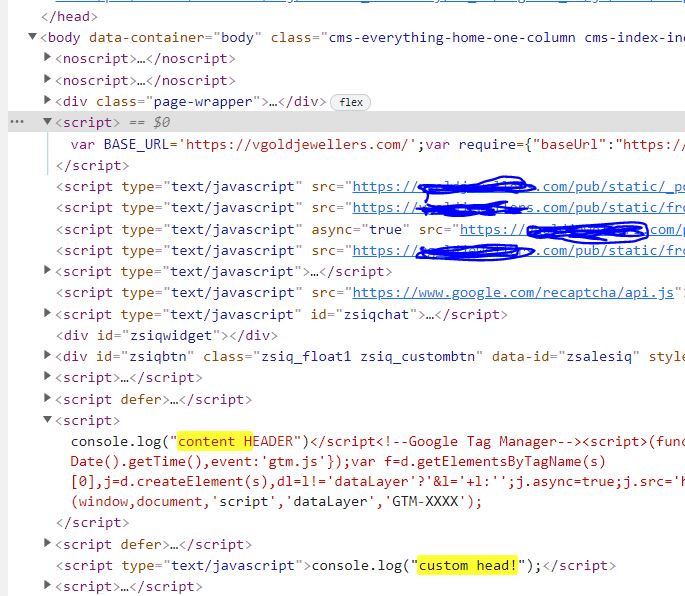
where I’m doing wrong. can I get some help? Thank you in advance