Hi I have this Lenovo T14 gen1 AMD laptop.
Recently I find my laptop has very high sleep power usage. Here you can see I disconnected the laptop from the charger at 11PM with 75% battery and 10 hours later there’s only 35% left.

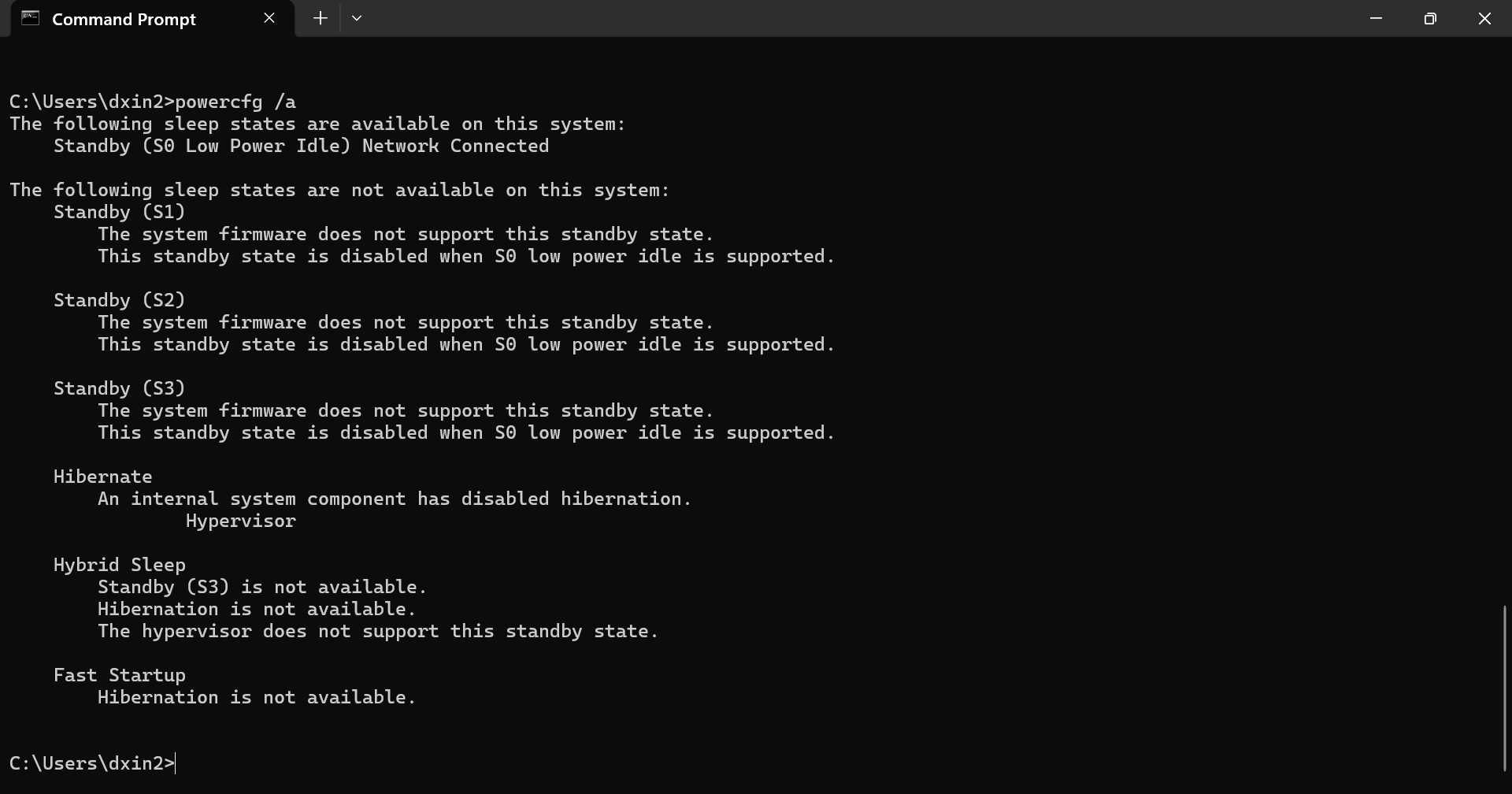
I checked powercfg and found this. So I have lost all S states, and I also don’t have hibernation?
What system changes I did before this problem:
- I tried Lenovo’s intelligent standby mode(it tries to bring the system into or out of hibernation based on daily usage pattern), then turned it off.
- Windows update(automatic)
- BIOS update(automatic)
What’s wrong here and how can I bring back the S states and hibernation? Are there multiple things wrong at the same time? Because powercfg report says system firmware disabled the S states, and Windows Hypervisor disabled hibernation?
Update:
S0 state seems normal on a modern laptop, but hibernation should be available. I tried to uninstall Hyper-V components but it didn’t help.
Below shows Hyper V is already uninstalled.


