I have a Windows 10 machine. I’ve manually configured it to use my MikroTik router which is set up as an NTP server (tested with another, local, Arch machine and it works fine).
It used to work fine but now it can’t sync time.
Short version: Win10 machine sends and receives an answer, seems to ignore it, using another NTP server works fine.
C:> w32tm /resync /force
Sending resync command to local computer
The computer did not resync because no time data was available.

C:> w32tm /query /source
Local CMOS Clock

C:> w32tm /query /configuration
[Configuration]

EventLogFlags: 2 (Local)
AnnounceFlags: 5 (Local)
TimeJumpAuditOffset: 28800 (Local)
MinPollInterval: 10 (Local)
MaxPollInterval: 15 (Local)
MaxNegPhaseCorrection: 54000 (Local)
MaxPosPhaseCorrection: 54000 (Local)
MaxAllowedPhaseOffset: 1 (Local)

FrequencyCorrectRate: 4 (Local)
PollAdjustFactor: 5 (Local)
LargePhaseOffset: 50000000 (Local)
SpikeWatchPeriod: 900 (Local)
LocalClockDispersion: 10 (Local)
HoldPeriod: 5 (Local)
PhaseCorrectRate: 1 (Local)
UpdateInterval: 360000 (Local)


[TimeProviders]

NtpClient (Local)
DllName: C:WindowsSYSTEM32w32time.DLL (Local)
Enabled: 1 (Local)
InputProvider: 1 (Local)
AllowNonstandardModeCombinations: 1 (Local)
ResolvePeerBackoffMinutes: 15 (Local)
ResolvePeerBackoffMaxTimes: 7 (Local)
CompatibilityFlags: 2147483648 (Local)
EventLogFlags: 1 (Local)
LargeSampleSkew: 3 (Local)
SpecialPollInterval: 32768 (Local)
Type: NTP (Local)
NtpServer: <router IP addr> (Local)

NtpServer (Local)
DllName: C:WindowsSYSTEM32w32time.DLL (Local)
Enabled: 0 (Local)
InputProvider: 0 (Local)

C:> w32tm /monitor
GetDcList failed with error code:  0x8007054B.
Exiting with error 0x8007054B
(it's not in a domain but just in case)
All event log entries for Time-Service are Information level and give absolutely no information what the issue is. Only a single entry is created after running resync force and it is
W32time Service received notification to rediscover its time sources and/or resynchronize time. Reason Code:0 System Tick Count: 439698984
Reason code description:
0 : An explicit time resynchronization request from an administrator
1 : Power state changes on this machine
2 : Changes to the network interface or to the network topology
3 : State changes within W32time that require time synchronization
The actions that follow this notifcation may impact fine-grained time synchronization accuracy.For more information, see https://go.microsoft.com/fwlink/?linkid=845961.
Using Wireshark I see the Win10 machine sending the NTP request and the router immediately returning an answer that seems to be OK:
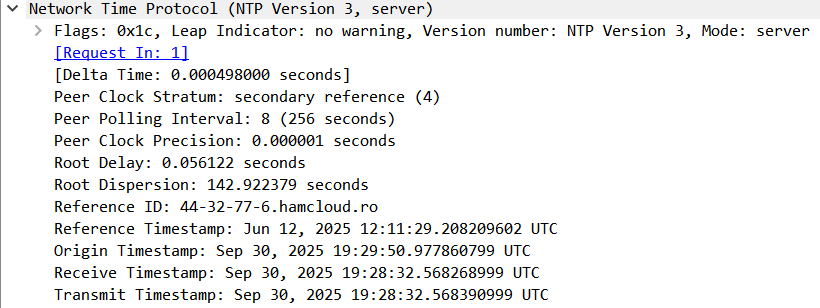
Running the command w32tm /config /manualpeerlist:"us.pool.ntp.org" /reliable:yes /update fixes things, as Windows is able to sync with that NTP server.
The Win10 machine and router are connected directly via cable.
