I organize files fairly extensively however I dislike having to constantly navigate around the explorer file tree to change folders. I would like to add single-click buttons on the Windows Command Bar to simply instantly navigate to a folder. An example directory location:
D:My DocumentsPicturesNatureWeather Maps
For those who don’t know what the Command Bar is, it has commands such as “Organize” and “New Folder”. I’ve outlined it in green:
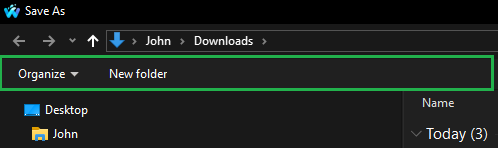
You can open it via Waterfox, Firefox, Vivaldi or Chrome on Windows right now by simply pressing Control + S to save this page.
I tried Custom Explorer Toolbar but it errors out and Nir repsonded to my email saying it was designed specifically for Windows 7:
https://www.nirsoft.net/utils/custom_explorer_toolbar.html
I tried OldNewExplorer though it does nothing:
https://msfn.org/board/topic/170375-oldnewexplorer-119/
I use Open Shell though it doesn’t seem to give any options for the save dialog widow.
- For clarification I am not referring the old style with the Places button (customizable by using the Places application by simpli software), e.g. explicitly not Add shortcut to Windows’ “Save As” dialog?.
How do I add single-click folder shortcuts to the command bar in the Windows Save Dialog window?


