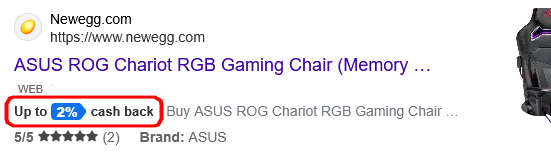
When using the Firefox browser (not Microsoft Edge), when I search on bing.com I see these little “Up to 2% cash back” prefixes to, or tags on, several search results. This is on Windows 10 22H2.
When I click on the “cash back,” it pops up a “Microsoft Rewards” window.
How do I turn these off?
I looked at about 500 web search results on this topic and here are some clarifications to keep your potential answers away from those ideas:
- I have never used the Microsoft Edge browser on this computer.
- I do not have a Microsoft Account.
- I do not have any “bing” programs installed as listed in “Add or remove programs.”
- Firefox does not have any “Bing” extensions installed.
- I have uBlock origin (the original) installed and functioning (even on bing.com it shows it blocked things).
- I have never used Microsoft Rewards and so I do not have any credits or balance.
- I just did a scan with Malwarebytes Anti-Malware and AdwCleaner and both were clean.
Here’s what the snippet/prefix/tag looks like:
And here’s what comes up when you click on it:

Clicking on the “Join now” link takes you to first bing.com and eventually live.com.
UPDATE: prompted by @FrankThomas’s comment, I used “element picker mode” of uBlock Origin and was able to filter it. The filter created was:
www.bing.com##.rebateAcfContainer
(It originally had an additional .clearfix which proved not necessary to block.