I recently bought a new Samsung 990 PRO 4TB NVMe SSD. Unfortunately, I accidentally dropped it from about 1.5 meters onto a ceramic tile floor. So I ran several tests using Samsung Magician.
- The SSD is installed as my laptop’s Windows 11 system drive
- BitLocker is enabled
- Firmware has already been updated to the latest version
The short/full SMART scan and short scan all completed successfully, so I moved the laptop from my bedroom to the living room and plugged to another power outlet (because I think it will take a long time) and started a full scan. It takes about 15 hours to complete the scan, below is the result:
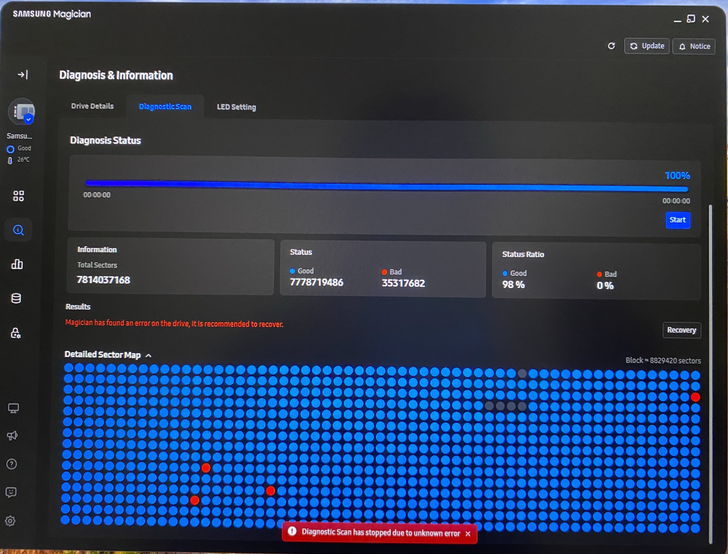
It showed “Diagnostic Scan has stopped due to unknown error” and “Magician has found an error on the drive, it is recommended to recover”. And there are 4 red dots indicating the bad sectors and 5 gray dots.
I did not click the “Recovery” button.
Later, I noticed that the a power outlet in the living room seemed unstable, because on the same outlet, an external USB hard drive also behaved abnormally and could not
be recognized properly.
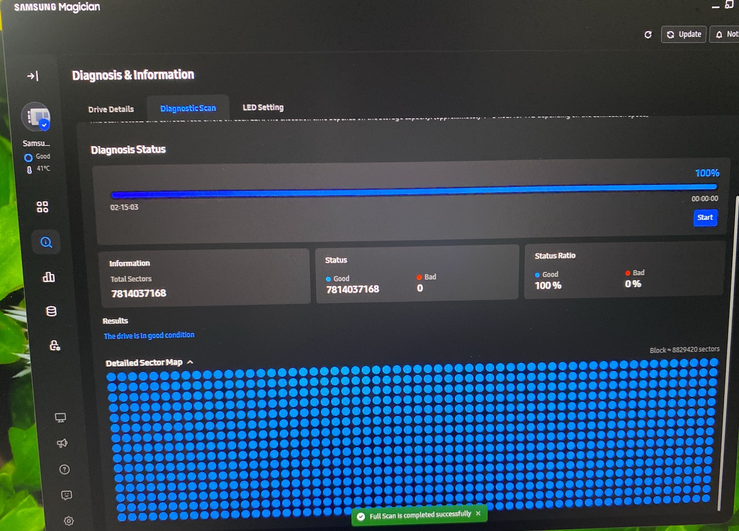
So I plugged the laptop to a more stable power outlet, then repeated a 2nd full scan test.
This time the scan completed successfully after ONLY 2 hours, below is the result:
Then I did additional practical testing:
Copied a 793 GB file to partition C: and verified it with fc /b
Copied an 816 GB file to partition D: and verified it with fc /b
Copied an 803 GB file to partition F: and verified it with fc /b
In all cases, the copy and verification completes successfully.
After these large-file tests, I keep the large files under partitions C:, D:, and F:, then I ran Full Scan again. The scan completes with only 1 hour, below is the result:
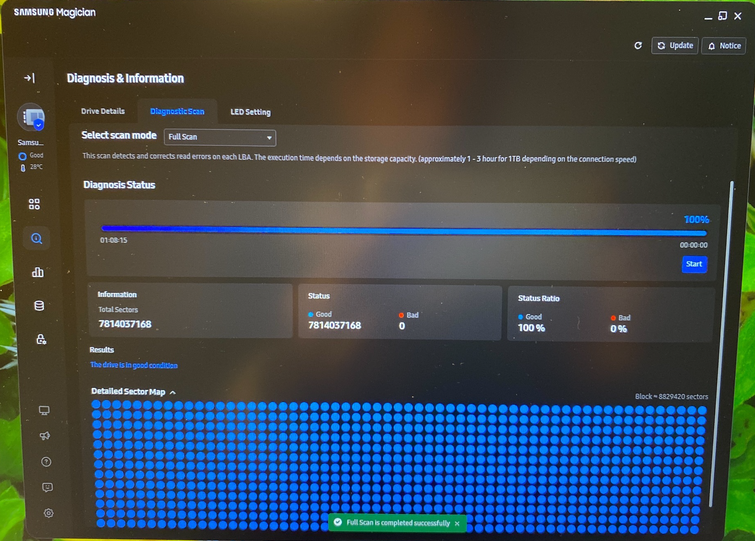
I also check the SMART data after the 3rd scan, as below:
Model Name, Samsung SSD 990 PRO 4TB
Drive Type, NVMe
Result,Byte End,Byte Start,Description,Raw Data,Status
,0,0,Critical Warning,0,OK
,2,1,Temperature (K),315,OK
,3,3,Available Spare,100,OK
,4,4,Available Spare Threshold,10,OK
,5,5,Percentage Used,0,OK
,47,32,Data Units Read,20215947,OK
,63,48,Data Units Written,6125878,OK
,79,64,Host Read Commands,31310363,OK
,95,80,Host Write Commands,13130048,OK
,111,96,Controller Busy Time,66,OK
,127,112,Power Cycles,45,OK
,143,128,Power On Hours,29,OK
,159,144,Unsafe Shutdowns,22,OK
,175,160,Media Errors,0,OK
,191,176,Number of Error Information Log Entries,0,OK
,195,192,Warning Composite Temperature Time,0,OK
,199,196,Critical Composite Temperature Time,0,OK
,201,200,Temperature Sensor 1,315,OK
,203,202,Temperature Sensor 2,338,OK
,205,204,Temperature Sensor 3,0,OK
,207,206,Temperature Sensor 4,0,OK
,209,208,Temperature Sensor 5,0,OK
,211,210,Temperature Sensor 6,0,OK
,213,212,Temperature Sensor 7,0,OK
,215,214,Temperature Sensor 8,0,OK
My question is:
How can I tell whether the bad blocks reported in the first Full Scan were only caused by environmental issues (unstable power outlet, system drive access, etc.), or whether the SSD actually detected bad blocks and internally remapped / masked them afterward, so that the 2nd/3rd scan did not find any bad sectors?
More specifically:
If an NVMe SSD internally remaps damaged physical blocks, would Samsung Magician / SMART usually show any evidence of that?
Will counters such as Media Errors or Error Information Log Entries increase in that case?
I notice all 3 scans reported the same total logical sector count (7814037168). If an internal remapping happens, will the sector count change?
Given the current SMART data and successful 2nd and 3rd scans, is it reasonable to conclude that the first bad-block result was likely a false result caused by the environment rather than real NAND damage?
I am mainly trying to determine whether this SSD is still trustworthy, or whether the first failed Full Scan found physical damaged blocks and then masked them internally so that the 2nd and 3rd scan never found any.
