Surprisingly, I haven’t found anyone else asking this, this question builds on the Windows 10 equivalent here.
For years I was accustomed to the above solution where if you’re working with a bunch of applications open and you know you need to go to the Control Panel for something not available (or easy to access) in the Windows 11 ‘Settings’, you could just hit WinKey + X or right-click on your Start button and go right to it, which I thought was faster/easier then doing Win + R or S and typing ‘Control’ then Enter.
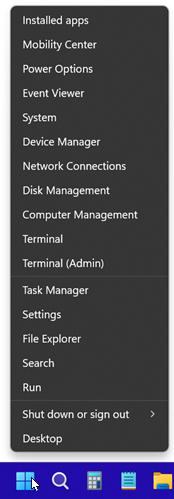
I tried variations of @andrew-savinykh‘s script as well as @sardar-usama‘s WinX Explorer path but neither seem to work in the revised Windows 11 version of the Start button right-click menu.
