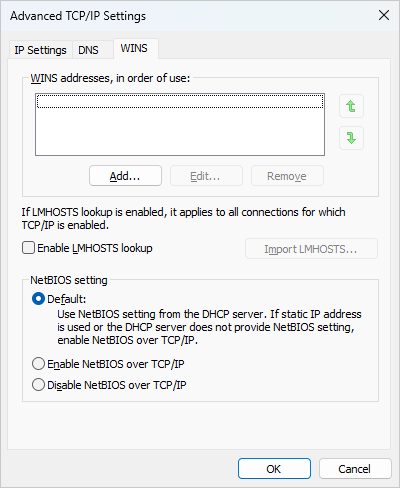
My Windows 11 (24H2) computer has Hyper-V enabled, and with that comes something called the “vEthernet Default Switch”. I have disabled NetBIOS on my ethernet adapter (via DHCP), and also the several bridge adapters for Hyper-V. But the so-called vEthernet Default Switch is recreated every time windows boots, and its netBios configuration starts with “Default” (which enables netbios in absence of DHCP) (and the Default Switch doesn’t use DHCP).
I need the NetBIOS listening port (139) to go away, as it antagonizes my security system (the windows firewall blocks it anyway, but it showing up on the list of listening ports is bad).
My original strategy was to disable the Default Switch’s vEthernet at boot, which had worked til now. But several more recent components I have installed (eg: docker) require the Default Switch to be present, so I cannot just disable the thing.
Despite many many minutes of frustrating searches, I haven’t found any netsh commands which disable netbios, or anything else. (AI dangles tantalizing bits in front of my eyes, but, as usual, it’s hallucinating)
What I’m looking for is a command line or scriptable way of disabling NetBIOS on a network interface. Or some way of telling hyperV to, when setting up the default switch, set up the vEthernet interface with NetBIOS disabled.
This other Super User question makes an oblique reference to NetBIOS, but he wants to delete the interface entirely.