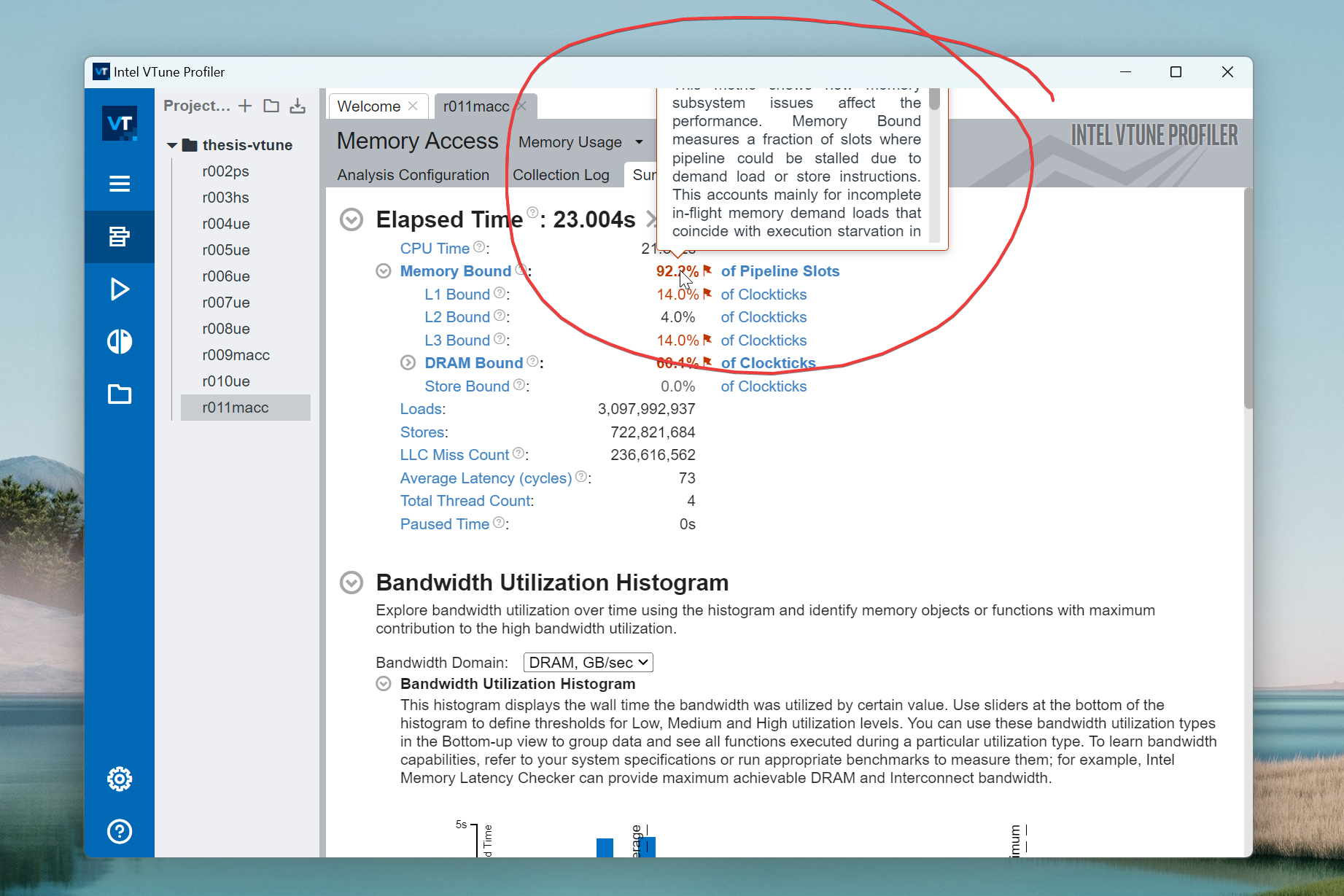
I’m using Intel VTune Profiler version 2025.3.0. When I hover my mouse over informational elements located in the top part of the main VTune window (see screenshot), the informational “tip” popup windows that appear are often positioned such that they partially extend beyond the boundaries of the main VTune application window.
As a result, a portion of the popup’s content is cut off and not visible.
These are internal UI elements rendered by VTune itself, not separate operating system windows. Therefore:
- Standard OS window moving techniques (like
Alt+Spacebar> Move) don’t work. - It isn’t possible to drag these popups to reposition them.
- Maximizing, resizing, or moving the main VTune window doesn’t affect this phenomenon.
This makes it difficult to read important contextual information provided by these tips.
My question is:
Has anyone else experienced this UI behavior with internal hover popups in VTune Profiler (especially recent versions)?
Are there any known workarounds, settings within VTune, or configuration changes that can prevent these popups from rendering partially off-screen or allow them to be repositioned?